Industrial computers rarely work in comfortable office conditions. They may sit inside a dusty control cabinet, beside vibrating machinery, or in a vehicle exposed to changing temperatures. In these settings, a fan can become a weak point by drawing in debris or adding another moving part. A Fanless Pc avoids that airflow, using passive cooling to release heat through its chassis. Quiet operation helps, too. But fanless does not mean maintenance-free or suitable for every workload.
This guide introduces seven fanless PCs for industrial applications, with attention to the details that matter on site: processor performance, cooling design, available ports, mounting options, and operating temperature ranges. A machine controlling a production line may need reliable serial connections, while a compact gateway might prioritize low power use and a small footprint. Check the manufacturer’s specifications carefully. Heat, enclosure placement, and sustained processing loads can affect real-world performance, even when a product appears suitable on paper.
There is no universal winner. That matters. A unit that excels in a clean automation cabinet may struggle when installed in a sealed, sun-warmed enclosure. The models in this overview should therefore be compared against the actual task, environment, and expansion needs—not just their processor names or price tags. Some trade-offs are easy to miss. The aim is to make those choices clearer, while recognizing that specifications alone cannot replace testing in your own installation.
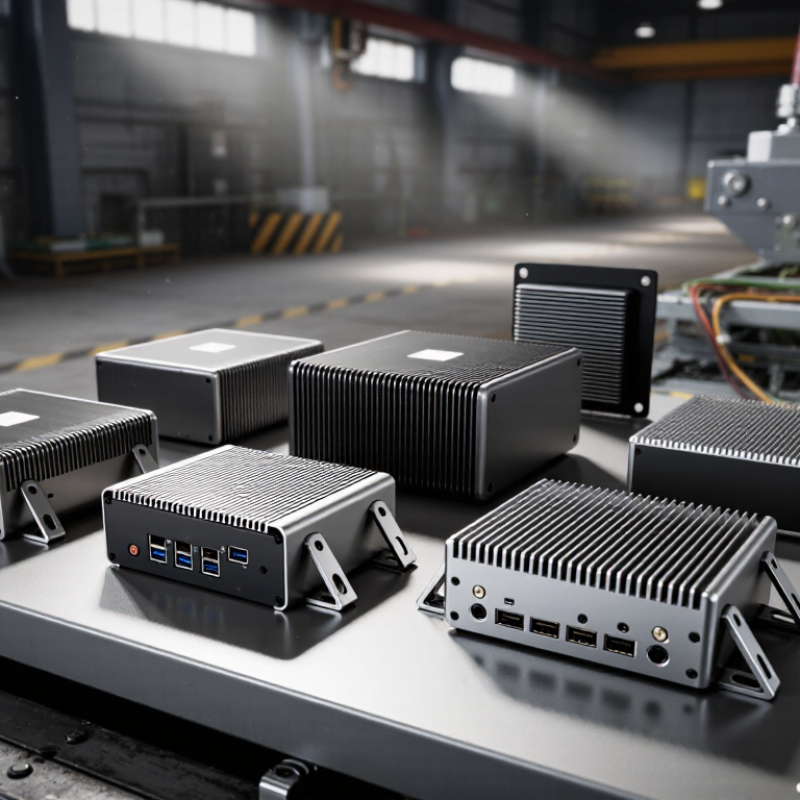
Fanless industrial PCs differ from conventional computers mainly in cooling, enclosure design, and operating conditions. Conventional computers often use fans to move heat away from their processors. A fanless unit transfers heat through a metal chassis or heat spreader instead. With no fan pulling air inside, less dust and fiber can enter the case. This can help near packaging lines and inside machine cabinets. But fanless does not mean heat disappears. Warmth still needs to escape, and poor airflow can raise internal temperatures.
These systems are often designed to handle wider temperature ranges, vibration, and long operating hours. Their ports and mounting options may fit DIN rails, control panels, or compact equipment bays. An office computer may offer more upgrade flexibility and cost less. An industrial model may trade some speed or expandability for a sturdier enclosure. That trade-off is not always worthwhile; a clean, climate-controlled office may not need rugged hardware. Check temperature limits, processor load, and mounting clearance against the actual installation.
Tips: Leave space around the chassis so heat can escape. Keep it out of direct sunlight, and measure temperatures during a full production shift. External cooling fins still collect dust. Clean them periodically, even without a fan. If the enclosure runs hot, reassess airflow before blaming the computer.

A fanless PC relies on its case to move heat, so check sustained performance, not just the processor’s peak speed. Compare the rated operating temperature with the hottest air inside the intended cabinet. Heat has nowhere to hide. Leave room around the chassis for natural airflow, and check whether nearby equipment could warm its surface. A compact unit may fit neatly on a panel but still throttle during long workloads. That trade-off is easy to miss.
Match the computer’s ports to the equipment it must connect to: count Ethernet, serial, USB, and display ports before installation. Confirm input voltage and whether the power supply can handle brief dips or electrical noise at the site. For vibration or dust, inspect mounting options, connector retention, and the enclosure’s stated protection rating.
Solid-state storage avoids moving parts, though capacity and write endurance still matter for frequent data logging. Test a representative workload in the actual enclosure when possible. A desk test can miss summer cabinet temperatures. I would also allow extra clearance, even if the layout looks awkward; neat drawings do not always reflect a crowded control panel.
Industrial sites need computers that keep running near dust, vibration, and heat. Fanless designs remove a moving part, but they still need a clear path for heat to escape. Seven useful types serve different installation needs: compact embedded box PCs, DIN-rail PCs, panel PCs, sealed rugged PCs, edge AI PCs, vehicle-mounted PCs, and fanless rackmount systems.
Compact box PCs fit inside cabinets and can handle control or data-logging tasks. DIN-rail models mount beside electrical equipment, keeping wiring short and accessible. Panel PCs combine a display and computer for operator stations; check screen readability under bright factory lighting. Sealed rugged units suit dusty areas, though their protection rating does not guarantee resistance to every chemical or washdown method. Details matter.
Edge AI PCs process camera or sensor data near the production line, reducing dependence on a remote server. Vehicle-mounted units are built for mobile equipment, where vibration and changing power conditions need careful review. Fanless rackmount systems consolidate monitoring or gateway workloads in control rooms. Heat is still the trade-off: a metal chassis needs room to shed it, especially during continuous, high-load operation.
Before selecting a type, compare operating temperature, mounting space, I/O ports, and service access. A small cabinet can become an oven. I would also test the intended workload in its actual enclosure; published processor limits alone may not predict real-world performance.
A fanless PC should be matched to the conditions around it, not selected by processor speed alone. In a dusty workshop, a sealed enclosure can reduce maintenance caused by clogged fans. But sealing also limits heat escape. Heat still matters. Check the rated operating temperature, then compare it with the cabinet’s real temperature during a full production shift. A reading taken on a cool morning may miss the afternoon peak.
For a machine mounted near motors or conveyors, look closely at vibration tolerance, mounting options, and connector retention. A loose cable can cause an intermittent fault that is difficult to trace. On a washdown line, confirm the enclosure’s ingress rating and how cables enter the case; an impressive rating is less useful if installation leaves gaps. These details deserve more attention than a long list of ports.
Match computing resources to the actual workload. A controller handling sensor data may need reliable serial or Ethernet connections more than a high-end processor. For machine vision, sustained processing and thermal headroom matter more. Check whether the unit can run continuously at the site’s ambient temperature, and review storage endurance if it logs data all day. One easy mistake is assuming fanless means maintenance-free. Dust can still collect on external surfaces, and a tightly enclosed cabinet can trap heat. Pilot testing in the intended mounting position may reveal issues that a specification sheet cannot.
Use the enclosure’s IP rating as one factor when matching a fanless PC to its installation environment. The chart shows the solid-object and water-protection digits for seven example ratings.
IP code digits follow IEC 60529. They indicate tested protection levels, not a linear performance score. Environment labels are examples; verify the rating of the complete PC assembly and installation before selection.
Before mounting a fanless industrial PC, check its heat path, not just its dimensions. A sealed metal case often sheds heat through its surface, so pressing it against insulation can raise internal temperatures. Leave the clearance specified by the manufacturer and avoid placing it above hot drives or near direct sunlight.
Small detail. Big consequence.
Use a rigid panel or suitable DIN-rail mount, then check vibration at the actual installation point. A cabinet door may look stable but flex when machinery starts. Route power and signal cables separately where practical, and leave enough slack for service access.
Confirm connector orientation before drilling; cramped ports can turn a simple replacement into a cabinet rework. Record ambient temperature during a normal production shift, not only during commissioning.
Maintenance is less frequent without fans, but it is not zero. Dust can still coat heat-dissipating surfaces, and loose terminals can cause intermittent faults. Inspect the enclosure, mounting hardware, cable glands, and visible corrosion on a scheduled basis. Keep vents or exposed cooling surfaces clear, even when the computer has no fan.
Check system logs for repeated thermal warnings or unexpected shutdowns. One limitation deserves attention: fanless designs can run hot in poorly ventilated cabinets, and software alerts may arrive late. A modest temperature sensor nearby can provide an independent check.